 CompassDocs
Single sign-on, done properly
Sign your team in with the identity provider you already run — SAML 2.0 for Okta, OneLogin, Google Workspace, and ADFS, or OpenID Connect for Microsoft Entra ID. Add SCIM and accounts manage themselves. One flat Enterprise price, self-hosted, no per-seat identity tax.
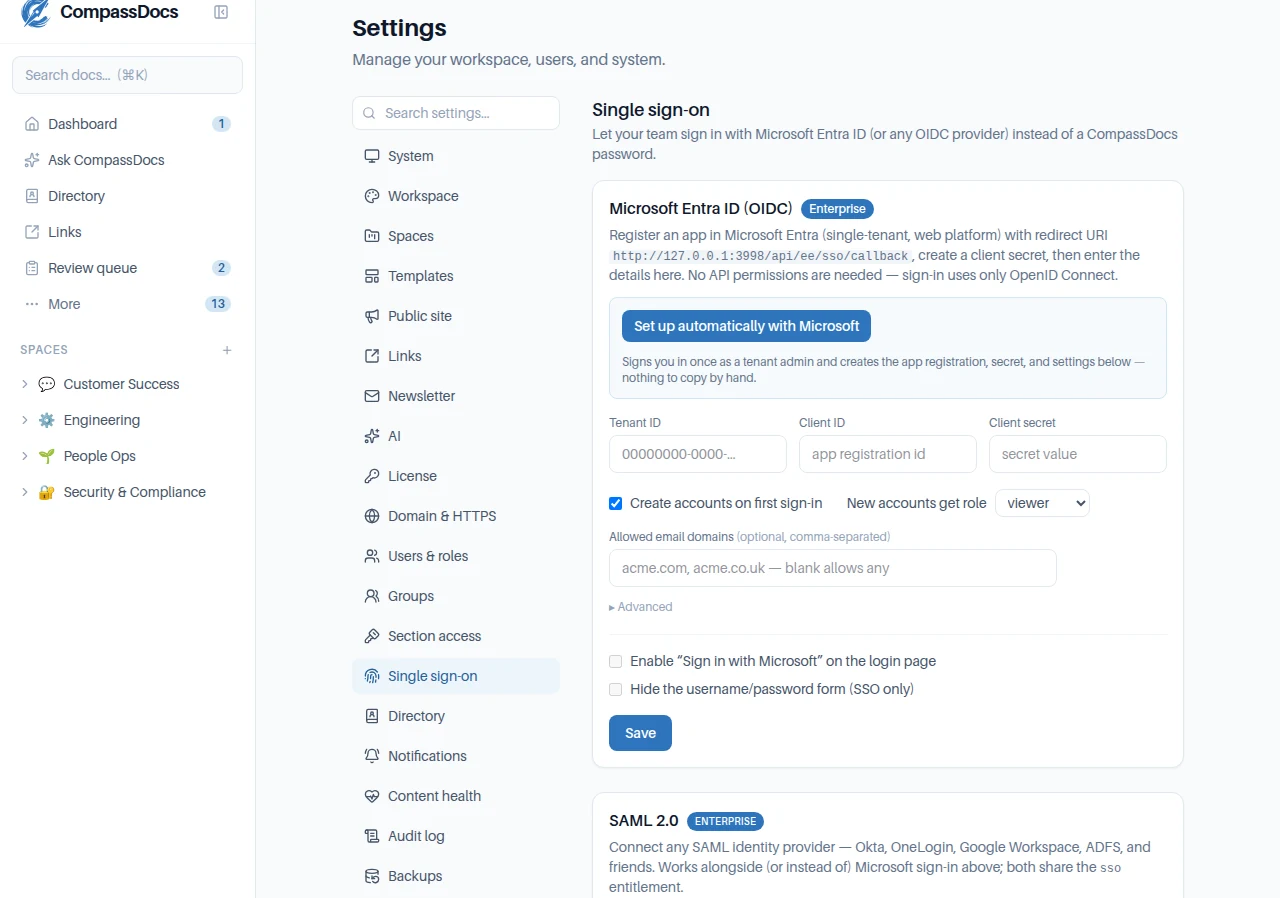
One settings page, both protocols — enable OIDC, SAML, or both.
What you get
- SAML 2.0 for any IdP — Okta, OneLogin, Google Workspace, ADFS, Entra SAML apps
- OpenID Connect for Microsoft Entra ID, with one-click automated setup — no app registration by hand
- Paste your IdP’s metadata XML and the endpoints and certificate fill themselves in
- Just-in-time provisioning: new people get an account on first sign-in, with the role you choose
- Restrict sign-in to your email domains, and hide the password form entirely with “SSO only”
- A break-glass path means an admin can always get back in
Both protocols, one license
OIDC and SAML share a single sso entitlement — there’s no separate SAML tier and no per-connection fee.
SCIM lifecycle
Pair with SCIM and Entra creates, updates, and deactivates accounts for you — leavers are cut off and their sessions revoked at once.
Verified & audited
Signed-assertion and ID-token validation, replay-resistant flows, and every sign-in, provisioning, and setting change in the append-only audit log.
SAML or OIDC — your call
The end-user experience and the account model are identical. Pick whichever your identity provider speaks — or run both side by side.
SAML 2.0
For Okta, OneLogin, Google Workspace, ADFS, and any other SAML IdP. Hand your IdP the SP entity ID and ACS URL (or its metadata URL), paste the IdP’s metadata back, and you’re live. Assertions are signature-verified against your IdP’s certificate, and each sign-in is bound to the request that started it — replayed or unsolicited responses are refused.
OpenID Connect
First-class for Microsoft Entra ID with a genuine one-click setup: sign in once as a tenant admin and CompassDocs creates the app registration, secret, and service principal for you — keeping no standing Microsoft permission. Any other OIDC provider works via a custom authority. Authorization code + PKCE, with full ID-token validation.
Frequently asked
Which identity providers does CompassDocs support?
Any OpenID Connect provider (Microsoft Entra ID is first-class, with one-click setup) and any SAML 2.0 identity provider — Okta, OneLogin, Google Workspace, ADFS, and Entra SAML apps. Run OIDC, SAML, or both at once.
Is SSO an extra add-on?
No. SSO — both OIDC and SAML — is included in the single Enterprise license. There’s no per-connection surcharge and no separate SAML tier, unlike the “SSO tax” some vendors charge.
Does CompassDocs support SCIM provisioning?
Yes. Pair SSO with SCIM and Microsoft Entra creates, updates, and deactivates accounts automatically — new hires appear, and departing employees are deactivated with their sessions revoked immediately.
What happens if the identity provider is down?
A break-glass local sign-in path stays available so an administrator can always get in, even with “SSO only” enabled — then simply turn SSO-only back off from settings.
Related: Roles & approvals · People directory & Entra sync · Admin console · SSO setup docs
Enterprise identity, without the enterprise bill
Self-host CompassDocs with one Docker command and unlimited users. Enterprise adds SSO (OIDC & SAML), Microsoft 365 sync, SCIM, compliance, and training for a flat $599/year.
Get started in 2 minutes See pricing