 CompassDocs
A SharePoint wiki alternative that still signs in with Microsoft 365
Many teams build their internal wiki from SharePoint sites and pages. CompassDocs is made only for written knowledge: spaces, approvals, version history and AI answers that cite your docs. It’s self-hosted and open source, and on Enterprise people sign in with Microsoft Entra and the directory syncs from Microsoft 365.
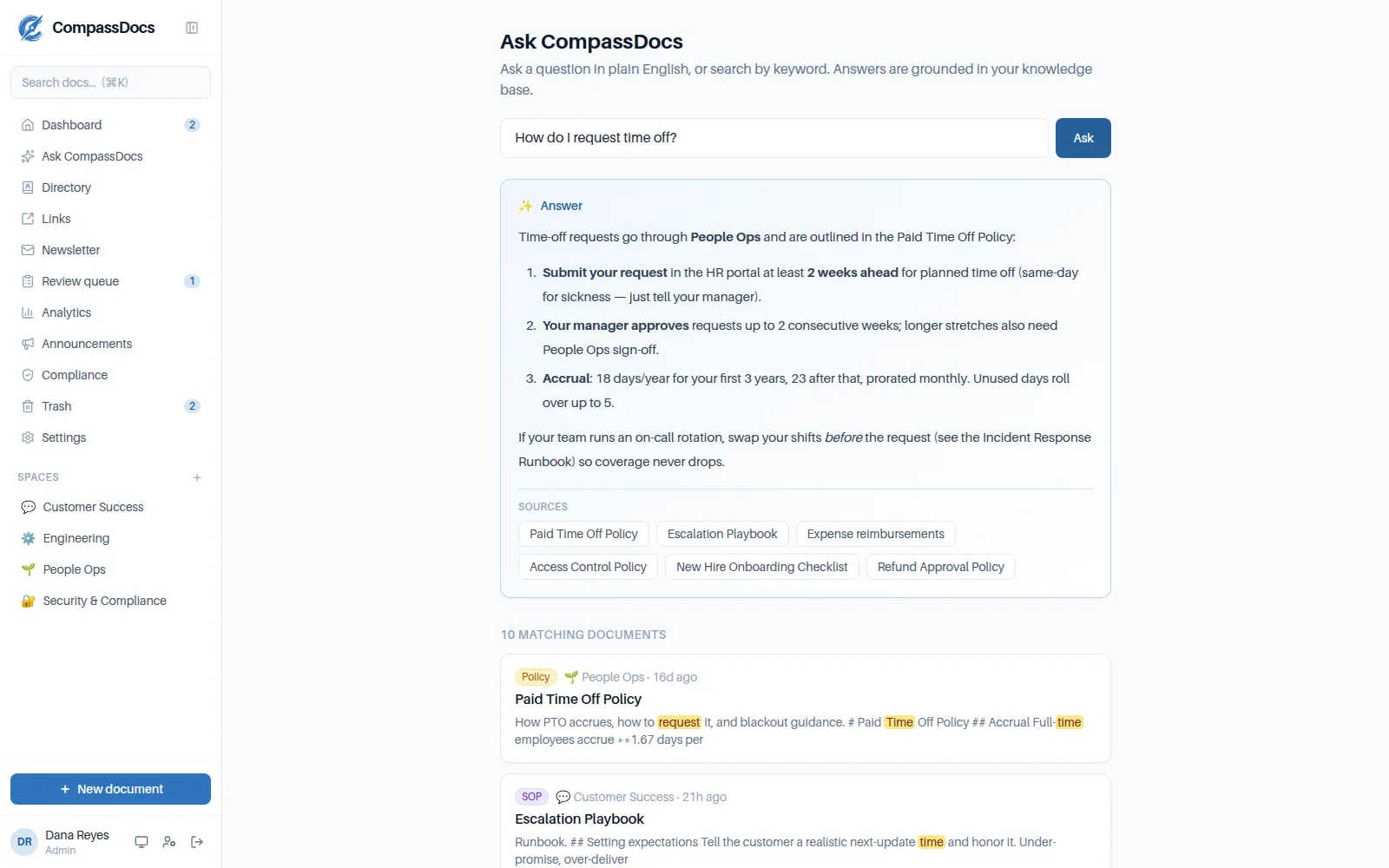
Ask in plain English and get an answer that cites the documents it came from.
Why teams move their wiki off SharePoint
- A tool made for written knowledge: typed documents, templates for SOPs, runbooks and policies, and review reminders
- Approvals before changes go live, and version history with side-by-side compare and one-click restore
- AI answers grounded only in your documents, with citations; keyword search works without an AI key
- Policy handbooks for everyone, plus read confirmations and training on Enterprise
- An internal helpdesk on the same install when you need one
Keeps your Microsoft sign-in
Enterprise adds one-click Microsoft Entra sign-in, SCIM, directory sync and Entra groups for private spaces.
Docs that stay current
Give any document a review cadence: overdue notices, an editor queue and reminders keep it honest.
Your servers, your data
Self-host with Docker, or deploy to your own Azure subscription with the one-click wizard.
CompassDocs and SharePoint side by side
SharePoint is a broad document and intranet platform; CompassDocs does one part of that job. Here’s how they differ for an internal wiki.
| Compared | CompassDocs | SharePoint |
|---|---|---|
| What it is | A knowledge base, with an optional internal helpdesk | A document and intranet platform, part of Microsoft 365 |
| Hosting | Self-hosted on your servers or your Azure subscription, in your own PostgreSQL database | SharePoint Online is hosted by Microsoft; SharePoint Server is a separate on-premises product |
| Source code | Open source, AGPL-3.0 | Proprietary |
| Pricing model | Community: free. Enterprise: $499.99/year per install, unlimited users | Licensed per user, usually as part of Microsoft 365 plans |
| Knowledge base | Purpose-built: spaces, typed documents, templates, approvals, version history, review reminders and policy handbooks | Built from the sites, pages and document libraries you set up |
| Helpdesk | Enterprise: Get help, the desk, request types, workflows and approvals, SLAs, automations, assets, major incidents and reports | Not a helpdesk product on its own |
| AI answers from your docs | Cited answers grounded only in your documents, with your own Anthropic key (keyword search is free) | Microsoft offers Copilot; see Microsoft for licensing |
| Sign-in | Enterprise: Microsoft Entra (one-click OIDC) or SAML 2.0, SCIM, directory and Entra group sync. Community: CompassDocs accounts with two-factor auth | Your Microsoft 365 (Entra ID) accounts |
| Microsoft 365 | Teams notifications, an Outlook add-in, and Microsoft 365 mailboxes for the helpdesk | A native part of Microsoft 365 |
SharePoint details describe its general model, not a specific plan. Check Microsoft for current plans, features and pricing.
When SharePoint is the better fit
SharePoint is likely the better choice if:
You want no extra system
If your organisation is standardised on Microsoft 365 and SharePoint is already licensed, it’s managed with the admin and compliance tools you already use.
Your knowledge is mostly Office files
Co-authoring Word, Excel and PowerPoint files in document libraries is SharePoint’s home ground. CompassDocs is page-first, with attachments.
You’re building an intranet portal
For company-wide intranet sites with custom layouts, SharePoint is designed for that. CompassDocs focuses on documentation.
Moving your wiki pages across
You don’t have to leave SharePoint behind: keep document libraries for files, and move written how-tos and policies to CompassDocs.
Run one command
The installer starts CompassDocs and PostgreSQL with Docker. Prefer Azure? The Deploy-to-Azure wizard sets up a VM in your own subscription.
Turn on Microsoft sign-in
With Enterprise, connect Microsoft Entra in one click, add SCIM, and sync the directory and Entra groups.
Bring your pages
Convert pages to front-matter Markdown and import them into a space for each team, attaching the files that belong with them.
Meet people where they work
Send review and publish notices to Teams, and add the Outlook add-in so people can search and link docs while writing email.
$ curl -fsSL https://raw.githubusercontent.com/mattny20/CompassDocs/main/install.sh | bash
  ✓ Fetched docker-compose.yml
  ✓ Generated .env with fresh secrets
  ▲ CompassDocs running at http://localhost:3000
  → open the URL to create your admin account
Requirements, platforms and the Node.js install path are on the self-hosting page →
Frequently asked
Can we keep using SharePoint?
Yes. You can keep SharePoint document libraries for Office files and use CompassDocs for written how-tos, SOPs and policies, linking to files where you need them.
Do people sign in with their Microsoft 365 accounts?
On Enterprise, yes: single sign-on with Microsoft Entra ID (one-click OIDC setup) or SAML 2.0, SCIM to create and remove accounts, and directory and Entra group sync. The free Community edition uses CompassDocs accounts with two-factor authentication.
Is there a SharePoint importer?
No. CompassDocs imports and exports front-matter Markdown, so pages need converting to Markdown first. Your whole knowledge base exports back out the same way at any time.
How is it priced?
The self-hosted Community edition is free with unlimited users. Enterprise is $499.99 a year per install with unlimited users, and adds SSO, Microsoft 365 sync, read confirmations, training and the helpdesk (3 agents included, extra agents $125 a year each).
Related: Confluence alternative · Single sign-on · AI search · Self-hosting
Free & open source to self-host
One Docker command installs CompassDocs with unlimited users and documents. Enterprise adds Microsoft Entra sign-in, Microsoft 365 sync, read confirmations, training and the helpdesk for $499.99/year.
Self-host free Get a quoteWant to test Entra sign-in against your tenant first? Request a trial license · See pricing