 CompassDocs
The helpdesk that already knows your docs
Employees ask for help in Get help, right inside CompassDocs, and search your guides before they send anything. IT, HR and Facilities work tickets in the desk: a full-screen workspace with live queues that stays open in its own tab and installs as an app with push notifications. Same sign-in, same directory, same documents, and part of Enterprise with 3 agents included.
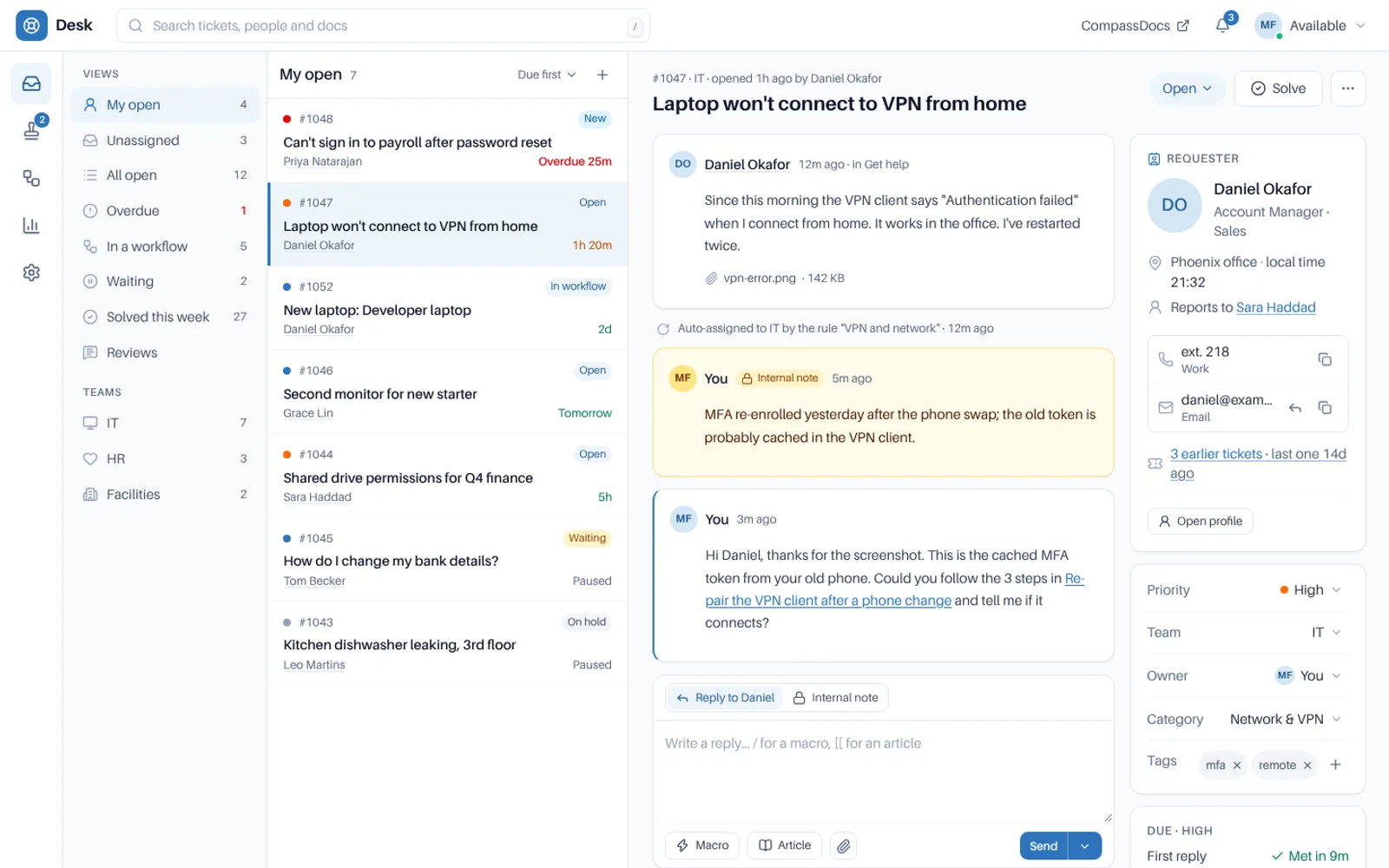
The desk: views and team queues with live counts, a split ticket view, internal notes, and the reply-target clock beside every ticket.
Twenty-four releases since it launched.
The helpdesk shipped in 1.19.0. Since then it has gained live queues, Claude, Microsoft 365 mail, Teams and Slack, assets, an API and much more.
The queue updates live
New tickets slide in within seconds, counts roll, and your place is kept.
Learn more →Claude in the desk
Drafts the reply, ticks checklists, suggests macros and drafts rules. A person sends.
Learn more →Microsoft 365 mailboxes
Read help mailboxes through Microsoft Graph and see each email as it was sent.
Learn more →Event calendar
Room setups, meetings and visits, with reminders and calendar feeds.
Learn more →Categories, custom fields, Before you solve
One shared list, your own fields, and a finish line every ticket crosses.
Learn more →Duo before the desk
A Duo approval after sign-in, or only when someone opens the desk.
Learn more →For agents
The desk and the tools that make every reply faster.
The desk
A full-screen workspace with live queues, a split ticket view, keyboard shortcuts and a pop-out reply window.
Learn more →Help addresses, Microsoft 365 mailboxes on Microsoft Graph, send-from addresses, and every email shown as it was sent.
Learn more →Automations & macros
Rules that sort and answer tickets, macros and canned responses, and tickets that open themselves on a schedule.
Learn more →Claude in the desk
Claude reads the ticket as you, drafts the reply and suggests changes. A person always sends and applies.
Learn more →For requesters
The ways colleagues and customers ask for help and hear back.
Get help & customer portal
Get help inside CompassDocs for colleagues, a portal and help centre for people outside your organisation.
Learn more →Teams & Slack
Raise and follow requests, and approve them, from Microsoft Teams or Slack.
Learn more →Major incidents
One ticket for an outage, one update to everyone affected, and a banner in Get help.
Learn more →For service managers
The structure behind every request: forms, workflows, targets and numbers.
Request types & forms
Categories and sub-categories, custom fields, checklists and Before you solve rules.
Learn more →Workflows & approvals
Approvals, tasks for several teams, hand-offs and waits, tested before you publish.
Learn more →SLAs & assignment
Office hours, holidays and reply targets per team, plus assignment rules and on-call rotas.
Learn more →Event calendar
Room setups, meetings and visits on a calendar, with reminders and feeds for Outlook and Google.
Learn more →Reports & export
Dashboards you build, 30+ measures, drill-down to tickets, and CSV export of any list.
Learn more →For admins and IT
Connections, access and the controls your auditor will ask about.
Assets
Snipe-IT and Microsoft Intune devices on every ticket, with warranty, compliance and history.
Learn more →Integrations & API
Alert sources, a REST API, signed webhooks and import from Zoho Desk or CSV.
Learn more →Roles & permissions
Five desk roles from Newbie to Admin, scoped to teams, with reply review for new agents.
Learn more →Security & privacy
Duo and single sign-on, the audit log, retention, legal hold and a recycle bin.
Learn more →Settings & setup
Search every desk setting by any word for it, and a five-step setup with a starter set.
Learn more →From “I need help” to solved.
One sign-in for everyone, and one place where every request is tracked.
Someone asks
In Get help, the customer portal, Teams or Slack, by email, or a monitoring tool opens a ticket itself.
It finds its team and owner
Assignment rules, round robin or load balancing, skills, languages and on-call put it with the right person.
The work gets done
Approvals and tasks run across teams, the reply-target clock keeps time in business hours, and agents reply from the desk.
It’s solved and measured
Before you solve checks nothing was skipped, the requester rates it, and the dashboards count it.
Frequently asked
Does the helpdesk cost extra?
Not for a small desk. The helpdesk is part of CompassDocs Enterprise, $499.99 a year per install with unlimited users, and it includes 3 agents; each extra agent is $125 a year. Anyone can ask for help in Get help; only the active people on the desk’s Agents list count as agents. It ships in the Enterprise image and your Enterprise license turns it on.
Who can raise requests?
Your own colleagues, with the sign-in they already use for CompassDocs; there are no separate customer accounts to manage. Every built-in role includes the Get help permission, and you can add it to a custom role.
Who can work tickets?
People with the Helpdesk agent or Helpdesk manager role (or Administrators) who belong to a helpdesk team. Inside the desk, each agent’s desk role decides what they may do there.
What does push need?
HTTPS and outbound access from your server to the browsers’ push services. Brave also needs Use Google services for push messaging turned on, and the desk says so.
What happens without the license?
Get help and the desk stay out of the sidebar and the command palette, and /help and /desk show the license page. Everything else in CompassDocs keeps working.
Related: Helpdesk docs · What’s new · Notifications · Email templates · People directory · IT runbooks
A helpdesk without another tool to buy
Self-host CompassDocs with one Docker command. Enterprise adds the helpdesk, SSO, SCIM, directory sync, read confirmations and training for $499.99/year with unlimited users. The helpdesk includes 3 agents; extra agents are $125/year each.
Get started in 2 minutes See pricingBuying for a team? Get a formal quote to print for approval, or order by invoice with your PO number.