 CompassDocs
A desk your agents can live in all day
The desk is a full-screen workspace of its own, with the same sign-in as CompassDocs. Queues update live, tickets open beside the list, everything has a key, and a reply can pop out into its own window while you keep working.
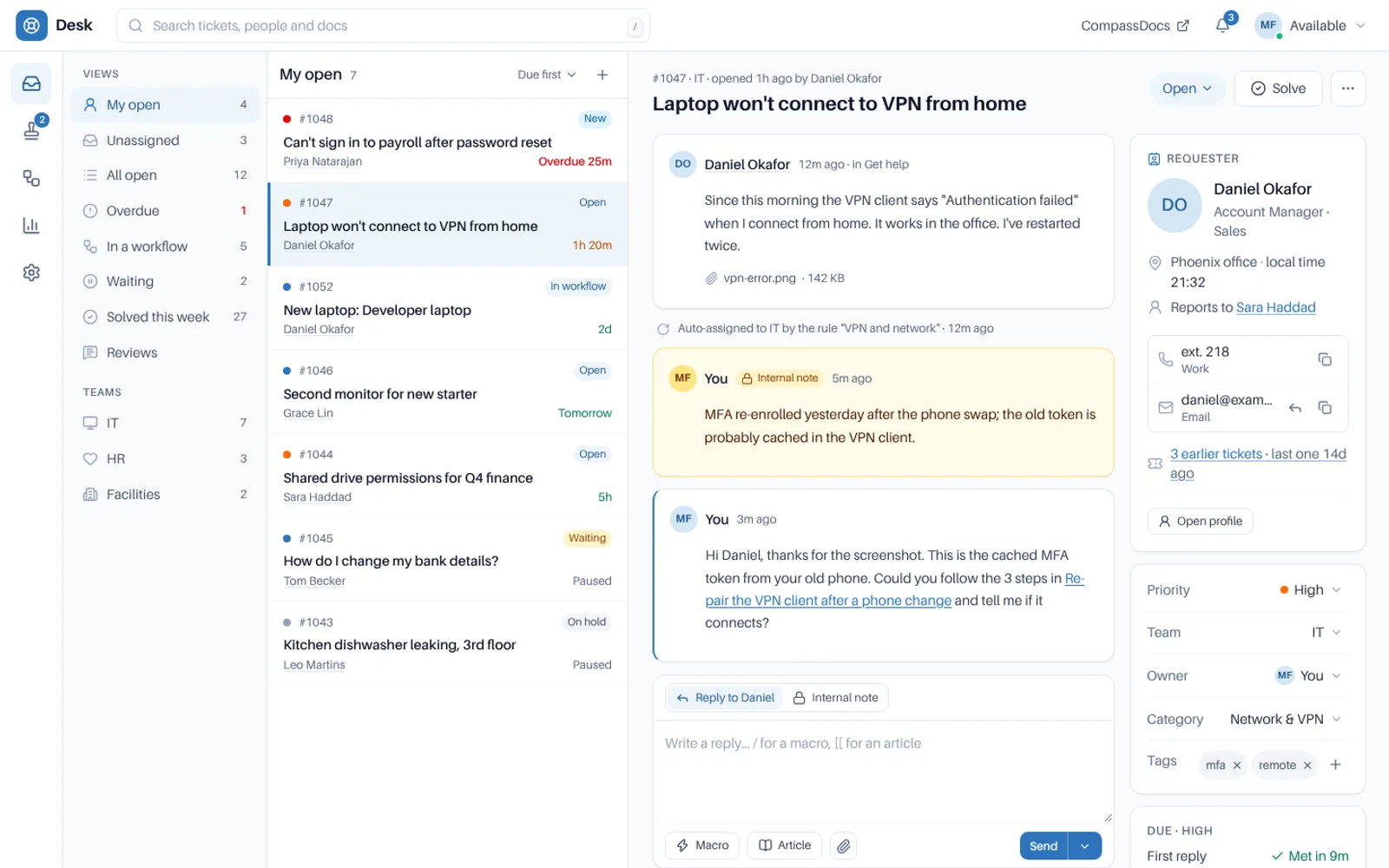
Views and team queues on the left, the list in the middle, the ticket beside it.
Shared inboxes and refresh buttons don’t scale.
× Agents reload to see what came in, and lose their place when they do.
× Two people answer the same ticket, and the requester gets two different replies.
× On a long ticket, the fields you need are a long scroll past the conversation.
→ The desk keeps every agent on the same live picture, and out of each other’s way.
Built for a whole day of tickets.
The queue updates itself.
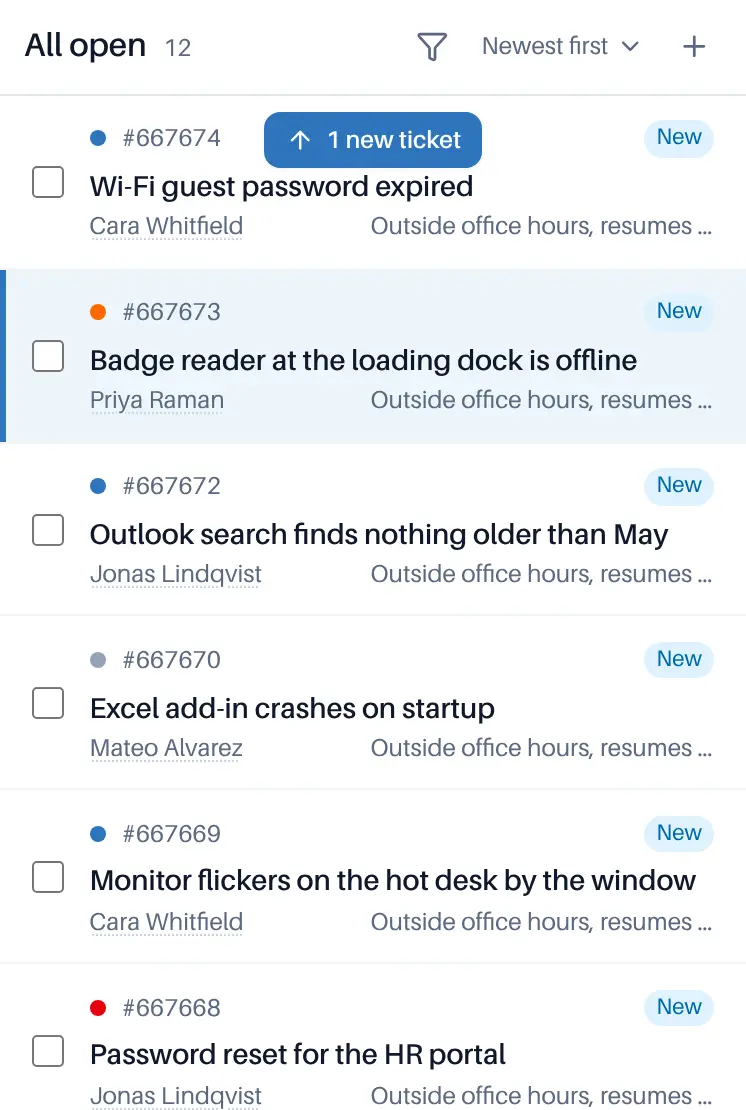
New and changed tickets show in the queue within a couple of seconds, with no reload. A new ticket slides in at its place and is briefly highlighted; one that is solved, reassigned or filtered out slides out; one that changes place moves there.
- Counts for My open, Unassigned, Overdue, Waiting, your saved views and your teams change with the same signal
- Your place is kept: if you have scrolled, are selecting rows or have a ticket open, nothing moves under you, and a 1 new ticket ↑ pill appears instead
- With reduced motion turned on, the list updates without animation
- You only hear about tickets you can see, and the signal carries no ticket content
The ticket opens beside the list.
Views (Mine, Unassigned, Open, Overdue, In workflow, Waiting, Solved this week) and team queues sit on the left, each with its count. Open a ticket and the list stays beside it. Every ticket has its own address, so links in email and chat open it directly.
- Filter by text, status, priority, team, owner, tag, age or custom field, and save the list as a view for yourself or a team
- Tick rows to merge duplicates, or change up to 200 tickets at once; each is checked on its own
- The conversation and the side panel scroll on their own, while the header and the requester strip stay put
- Search finds solved and closed tickets too
Reply in a window of its own.
Pop out, or Shift+O, moves the reply into its own window so you can keep using the desk. What you have typed, Reply or Internal note, attached files and a picked macro go with it. The ticket shows Replying in another window, with Show window and Bring back.
- Macros, canned responses, articles, attachments and Send with a status all work in the window
- Send, and the window closes and the ticket refreshes; close it without sending, and the reply comes back
- A reply is never sent twice, and only one window can send
- Several tickets at once; not shown on phones
Replying in another window
Your reply, its files and the picked macro are there.
I’ve renewed the VPN profile on your laptop. Please try again and let me know.
Know who else is on the ticket.
“Sam Lee is viewing” or “is replying” shows under the subject. If someone replies while you type, Send stops and shows you their message first: keep editing, discard yours or send anyway. Macros that send a reply warn too, and so does the pop-out window.
- Only agents who work the ticket see who is there; requesters and CCs never do
“Daniel, I’ve just reset your token from here, try now.” Sam Lee · just now
Keyboard first
j and k move, Enter opens, r replies, n adds a note, e solves, a takes the ticket, x selects and / searches. CtrlEnter sends.
The requester strip
Who asked, with their title, office and local time; Email, Call, Teams, Webex and Slack in one group; their devices, open and earlier tickets, and their manager.
Install it as an app
Install Desk gives it its own window on computers and phones. Push notifications in Chrome, Edge, Firefox, Brave and Safari, with quiet hours and a pause.
Share and print
Share a ticket with another agent, with a message. Print it or save it as a PDF, choosing what to include; CtrlP on a ticket opens the same dialog.
Follow and CC
Follow a ticket to hear of replies, notes and status changes. Requesters and agents copy colleagues in, who see the public conversation and never internal notes.
Your own artwork
Put artwork behind the desk with Solid, Subtle or Glass panels, chosen separately for light and dark mode. The desk dims it so text keeps WCAG AA contrast.
From sign-in to solved, in one tab.
Agents need a desk role and a team; everything else comes from CompassDocs.
Open the desk
Desk in the CompassDocs sidebar opens it in its own tab, with the same sign-in. Or install it as an app.
Pick a queue
Views and team queues with live counts. Filter, then save the list as your own view or your team’s.
Work the ticket
Reply or add an internal note, insert macros, canned responses and articles, and Send and set a status in one go.
Stay in flow
Keys for everything, a pop-out reply, collision warnings and push notifications to your devices.
Frequently asked
Do agents need another login?
No. The desk uses the same sign-in as CompassDocs, including single sign-on, and opens from the sidebar in a tab of its own.
What does live updating need from my server?
Nothing to run. If your database sits behind a connection pooler in transaction mode, the desk falls back to checking every 30 seconds, and a direct connection setting restores live updates. Proxies should not buffer the desk’s live address.
Does the desk work on a phone?
Yes. It installs to the Home Screen on iPhone, iPad and Android, with push notifications, and the ticket scrolls as one page. The pop-out reply window is for computers only.
Related: Email · Automations & macros · Claude in the desk · Roles & permissions · Notifications · Docs
More in the helpdesk
A helpdesk without another tool to buy
Self-host CompassDocs with one Docker command. The helpdesk is part of CompassDocs Enterprise, with 3 agents included (extra agents $125/year each), alongside SSO, SCIM, directory sync, read confirmations and training.
Buying for a team? Get a formal quote to print for approval, or order by invoice with your PO number.