 CompassDocs
Connect the tools you already run
An Integrations hub shows everything the helpdesk connects to, with its status. Monitoring tools open and solve their own tickets, a REST API and signed webhooks let your scripts work with tickets, and history comes across from Zoho Desk or CSV.
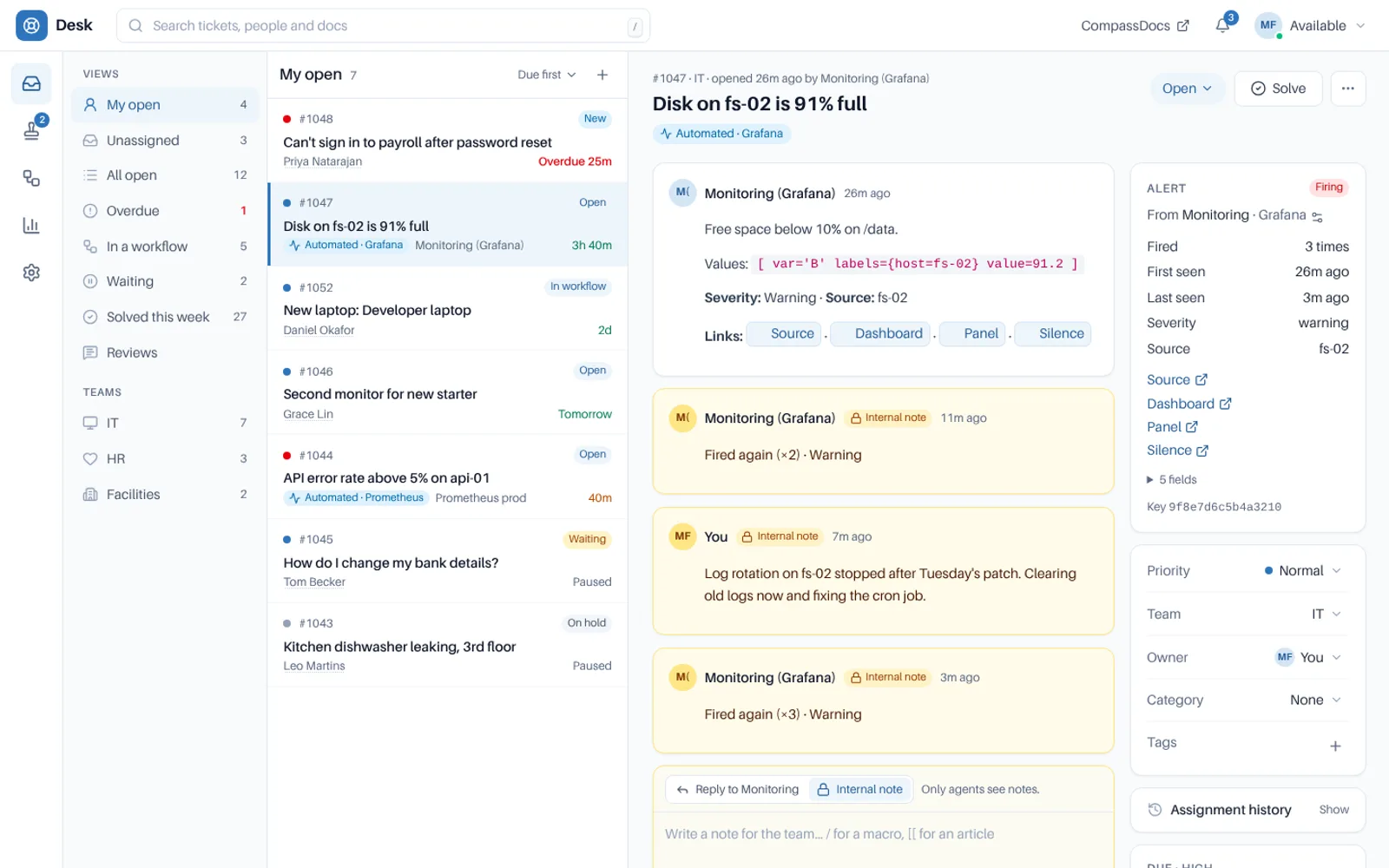
An alert from Grafana: repeats become notes, and a resolved alert solves the ticket.
A helpdesk that can’t talk to anything becomes another silo.
× Alerts land in a channel and nobody owns them.
× Scripts need an all-powerful token to do anything.
× Moving helpdesk means leaving years of history behind.
→ Every connection in one place, each with exactly the access it needs.
In, out and across.
The Integrations hub
Snipe-IT, Microsoft Intune, Teams, Slack, the Claude connector, Claude in the desk, the API and webhooks, and alert sources, as cards with their status.
Alert sources
Prometheus Alertmanager, Grafana, Datadog, Azure Monitor, PagerDuty-style events, generic webhooks and API bots open tickets, each with its own key, team, severity map and rate limit.
Alerts that dedupe
A repeat adds a note to the open ticket, a resolved alert solves it (never one a person has replied on), and automated tickets send no requester mail. A deliveries log shows what each alert became.
REST API
List and search tickets with cursor paging, read a ticket, change status, priority, team, owner, tags and category, add notes and replies, list approvals and read report numbers. Every call is checked like the desk.
Scoped tokens
API tokens act as a desk role with chosen teams, never above their creator’s. Shown once, with expiry, last used and Revoke. Changes made with one say via API.
Signed webhooks
Ticket, message, note and approval events, signed, sent in order per webhook and retried for 24 hours, with a delivery log and Send a test. A webhook failing for a day turns off and tells admins.
Import from Zoho Desk or CSV
Map departments, statuses, priorities and agents, check a dry run that counts what will happen, then import in the background. Safe to run again: tickets keep their source id and original times.
Audited
Every token, webhook, integration and API call that changes something is recorded in the audit log.
Keys kept safe
Integration keys are shown once and stored only as a hash, and repeated wrong keys are rate limited before anything is written.
Pick a connection, scope it, watch it.
Desk settings → Integrations is the one place to start.
Open the hub
See what is connected and what isn’t, at a glance.
Add a source or token
Choose the team, the severity map or the desk role and teams it acts as.
Point your tool at it
Paste the address and key into your monitoring tool, script or receiver.
Watch the log
Recent deliveries show what each alert or webhook did.
Related: Assets · Teams & Slack · Major incidents · Security & privacy · Docs
More in the helpdesk
A helpdesk without another tool to buy
Self-host CompassDocs with one Docker command. The helpdesk is part of CompassDocs Enterprise, with 3 agents included (extra agents $125/year each), alongside SSO, SCIM, directory sync, read confirmations and training.
Buying for a team? Get a formal quote to print for approval, or order by invoice with your PO number.