 CompassDocs
Claude helps. A person sends.
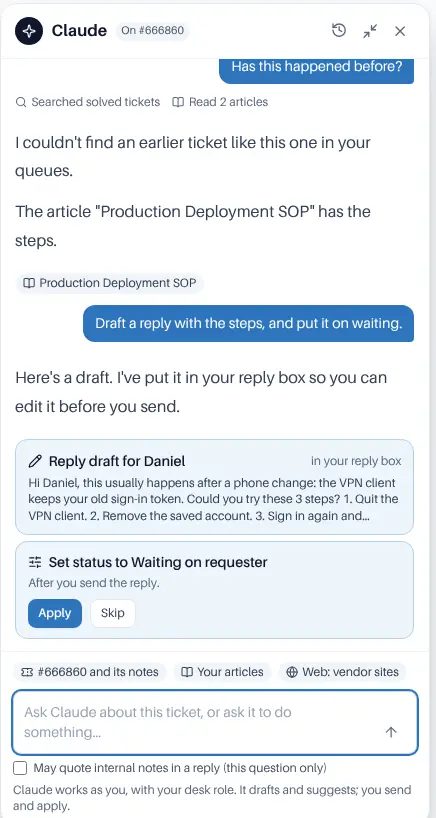
Claude in the desk is a chat docked beside the open ticket; the Claude connector brings the helpdesk into the Claude apps. Both work as the person using them, with their desk role and teams. Claude drafts and suggests. A person sends every reply and publishes every change.
AI in a helpdesk has to earn trust.
× Agents re-read long tickets and hunt for the fix someone found last month.
× AI that sends replies on its own isn’t something you can put in front of requesters.
× Admins want help writing rules, not a robot changing live settings.
→ Claude does the reading and the drafting. People keep every decision.
Help on every ticket, inside the rules.
A second pair of eyes beside the ticket.
Open it with the Claude button or CtrlJ. Quick prompts summarise the ticket, ask whether it has happened before, draft or translate a reply, or suggest what to do next. Claude reads the ticket and its notes, searches solved tickets, your articles and assets, and shows what it used.
- Drafts go straight into your reply or note box, for you to edit and send
- Changes to status, priority, tags, team or owner wait for you to press Apply
- Internal notes stay out of reply drafts unless you tick May quote internal notes for that question
- Text in a ticket is treated as data, never as instructions to Claude
Tick checklist items
Claude lists every checklist item it would tick, and you press Apply. It never solves a ticket: required items still have to be ticked first. It can also draft new checklists.
Suggest macros
A card names the ticket, lists what the macro will do and shows the whole reply. Apply runs it through the desk’s rules, and refuses if the macro or the ticket changed since.
Draft rules and schedules
Automation rules (saved off), recurring tickets (saved paused) and category changes (never a delete or merge) wait as drafts with Publish, Save draft and Discard.
The Claude connector
From the Claude apps: requesters raise and follow requests, agents read the queue, add notes and save reply drafts, and admins draft workflows, request types and macros.
Admins set the limits
Turn Claude in the desk on per team, choose what it may do, allow web search on listed sites only, and set monthly spending limits for the workspace and per agent.
Visible and audited
Changes made through Claude say via Claude on the ticket’s timeline, and every chat turn and applied change is in the audit log.
What Claude can never do.
Whatever the settings, and whoever asks, there is no tool for these.
- Send a reply to a requester, a macro’s reply included: it saves a draft and a person sends it
- Approve or decline: it links to the approval for you to decide in the app
- Publish a workflow, request type, macro, checklist, automation rule, recurring ticket or category change, or switch a rule or schedule on
- See more than you can: a ticket you don’t work answers as if it doesn’t exist, and a ticket in the recycle bin is never read
What is sent to Anthropic
Claude in the desk uses your workspace’s Anthropic API key and is off until an admin turns it on. Nothing is sent until an agent asks a question; then the question and the ticket as the agent sees it are sent to answer it. If ticket text must not leave your network, leave it off.
Drafts in, decisions out.
Claude in the desk and the connector both act as the person using them, with their desk role and teams.
An admin turns it on
Desk settings → Claude in the desk: which teams, what Claude may do, web search and monthly limits.
An agent asks
With a quick prompt or a question of their own, from the Claude button or CtrlJ.
Claude drafts and suggests
Into the reply box, or as cards with Apply and Skip, naming the tickets and articles it used.
The agent decides
Edits and sends the reply, applies the changes they agree with, and publishes drafts after review.
Frequently asked
Claude in the desk or the Claude connector?
Claude in the desk is a panel inside the desk that uses the workspace’s Anthropic API key, billed per use with monthly limits, set up by an admin. The connector works from the Claude apps on each person’s own Claude subscription. You can use both.
Is it on by default?
No. Claude in the desk is off until an admin turns it on, and so is its web search. The connector works only for people who connect it, within the level an admin sets.
Can Claude change a ticket on its own?
In the desk, no: changes wait for the agent to apply them. Through the connector, only when the workspace allows Also update tickets, within the person’s desk role, and never solving past required checklist items or Before you solve rules.
Related: AI search · Claude connector · Automations & macros · Security & privacy · Docs
More in the helpdesk
A helpdesk without another tool to buy
Self-host CompassDocs with one Docker command. The helpdesk is part of CompassDocs Enterprise, with 3 agents included (extra agents $125/year each), alongside SSO, SCIM, directory sync, read confirmations and training.
Buying for a team? Get a formal quote to print for approval, or order by invoice with your PO number.